
Live captions and translation for any audio on Windows
Watching a video without subtitles, or a call in a language you only half understand? Dave™ writes what’s being said at the bottom of your screen in real time and can translate it as it goes.
Click the CC button in Dave™’s dock and turn on Show captions. Choose whether to listen to your computer’s sound or your microphone, and pick a translation language if you want one. Live captions are part of Dave™ Premium.
Turn them on
- Click the CC button in Dave™’s dock.
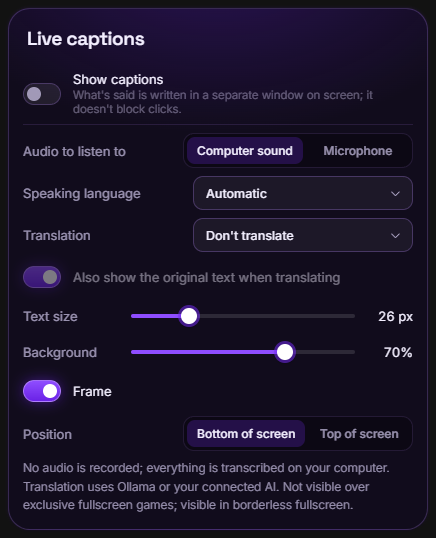
- Under Audio to listen to, pick Computer sound for videos, calls and games, or Microphone for people in the room.
- Leave Speaking language on automatic or choose the language.
- Turn on Show captions. A two-line caption box appears on your screen; it doesn’t block your clicks.
Translate as you watch
Pick a language under Translation. Each sentence is translated when it’s finished, by Ollama on your PC or by the AI you connected. Turn on Also show the original text when translating to see both.
Make them easy to read
Change the text size and the background, add a frame, and put the captions at the top or the bottom of the screen.
Privacy and limits
No audio is recorded; everything is transcribed on your computer. Captions don’t show over games in exclusive fullscreen; they do in borderless fullscreen. Windows 11 also has its own Live captions; Dave™’s captions run on Windows 10 too and can translate into 11 languages.
Questions
Does it work with YouTube and video calls?
Yes. With Computer sound, Dave™ captions whatever is playing on your PC: videos, calls, streams and games.
Which languages can it translate into?
English, German, French, Spanish, Portuguese, Dutch, Russian, Japanese, Korean, Chinese and Turkish.
Is the audio saved?
No. Nothing is recorded; speech is turned into text on your computer and the captions disappear as they scroll.
Do I need Premium?
Live captions are part of Dave™ Premium; the monthly and yearly plans start with a 3-day free trial.
For Windows 10 and 11. Dave™ is free to download; Premium features start with a 3-day free trial on the monthly and yearly plans.